AirForm: The Form Builder That Builds Itself, Then Reads the Replies
Most forms fail you in one of two ways. The simple ones just collect data and drop it somewhere, leaving you to read, sort, and chase every reply by hand. The good ones take real time to design, and even more time to maintain. Either way, the form is a chore at one end or the other.
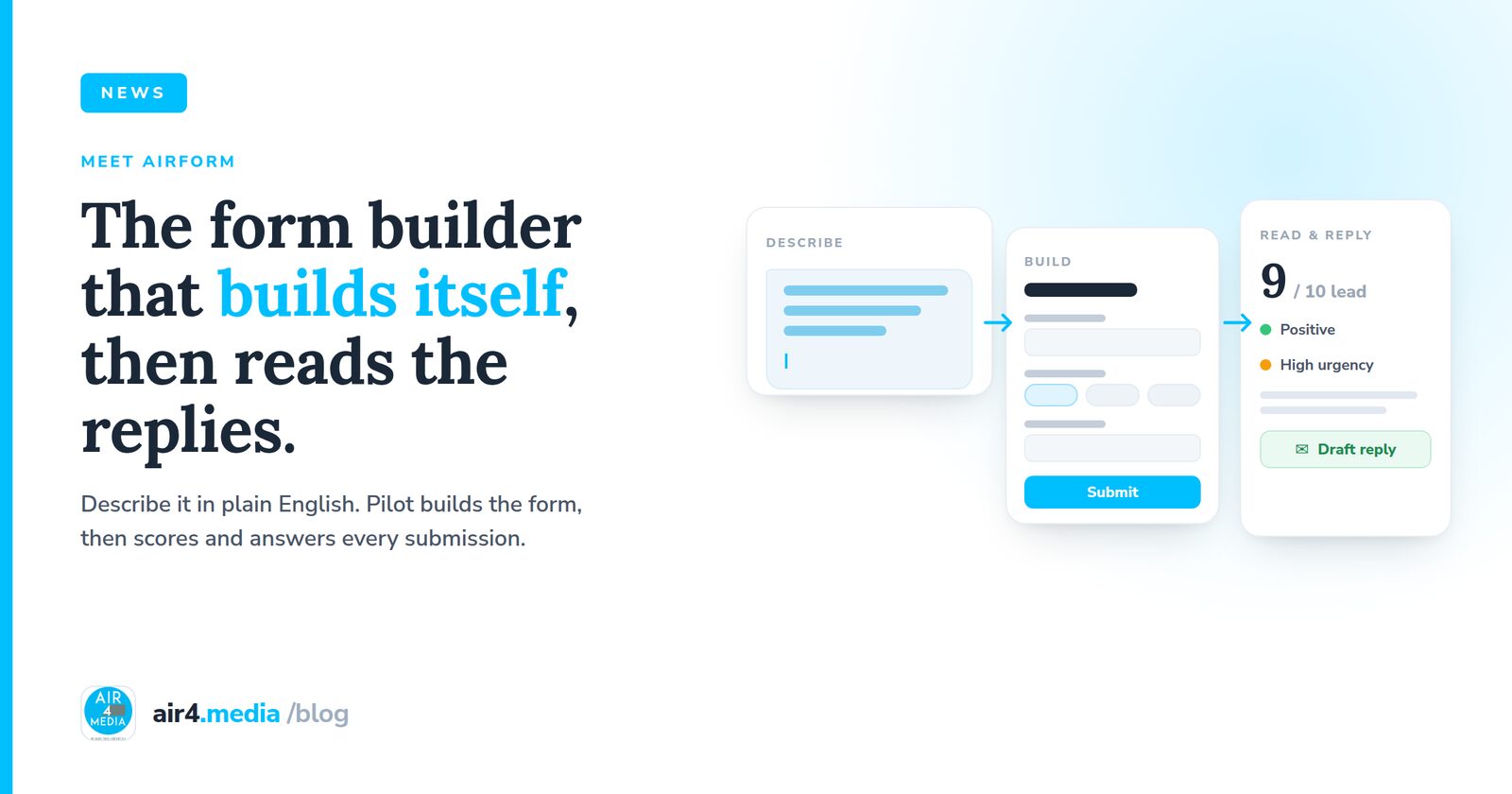
AirForm, the form builder inside Pilot by Air4 Media, is built to remove that trade-off. You describe what you need in plain English, and AirForm builds the whole form in seconds. Then, when people respond, it can read each submission, score it, summarize it, and even draft your reply, all inside the same platform where your contacts, assets, and follow-up already live. You can still build by hand with a drag-and-drop builder when you want full control, and any form you make can be embedded on your own website.
Describe it, and AirForm builds it
You start with a sentence. Tell AirForm about your business and what you want the form to do, the way you would explain it to a colleague. Something like: "I run an AI photo experience company and I want to ask clients what experience they want for their event." That is the whole input. If you want to steer it, you can add optional hints: pick a form purpose, set a tone of voice, or list the products and services you offer. But your description leads, and your words define what the form asks about.
From a single line, AirForm produces a complete, working form: a name, the right questions in a sensible order, the correct field type for each one, options and help text where they earn their place, a submit button label, and a success message for the end. It supports the field types you expect and the ones you forget you need: short text, email, phone, number, URL, long text, dropdowns, radio buttons, checkboxes, multi-select, dates and times, file and image uploads, ratings, ranges, and layout elements like headings and dividers to keep longer forms readable.
Because AirForm lives inside Pilot, the fields can map straight to your CRM. Name, email, phone, company, address, and more can flow directly into Pilot as a contact. A completed form is not a line in a spreadsheet you will get to later, it is a record in the system you already run your business from.
It understands what you are actually asking for
This is where AirForm parts ways with a template gallery. Before it writes a single field, it works out the real intent behind your request. A form that asks a client what they want for an upcoming event is a very different thing from a lead-capture form, an event registration, an order or booking request, or a survey about an experience that already happened. AirForm recognizes which one you mean and builds for it, so the questions fit the job.
That understanding has a practical payoff. If you set the purpose hint to one thing but describe another, your description wins. You get the form you asked for in words, not the one a half-chosen label implied. The goal is simple and transparent: understand what you are asking for so the form asks the right questions, and so each answer can be read in context later.
AirForm tailors its strategy across several form types, including Lead Qualification, Contact, Event Registration, Order or Booking Request, and Feedback Survey. The one worth dwelling on, especially if you design experiences for clients, is the Experience Brief.
An Experience Brief is a forward-looking creative brief. Instead of a flat "tell us about your inquiry," it captures what a client actually wants for an upcoming event: the theme and the vibe, the experiences they are excited about, the date, the guest count, the venue, branding needs, and a budget range. For an event or creative business, that is the gap between a vague lead and a brief you can quote and plan from. The client describes their dream event, and you receive something structured enough to act on the same day.
Designed to convert, not just collect
A form that asks the right things in the wrong order still loses people. AirForm builds with form-design principles that protect your completion rate:
- Progressive disclosure. The easy, engaging questions come first. The qualifying details come later, once someone is invested enough to answer them.
- Smart field ordering and clear labels, so nothing makes a visitor stop and wonder what you meant.
- Sensible required versus optional fields, so you ask for what you genuinely need without building a wall.
- Soft options on sensitive questions. Budget is the classic point of abandonment, so AirForm can offer a "need guidance" style choice instead of demanding a number, which keeps people moving.
- An attribution question, the familiar "how did you hear about us," so you learn where your best inquiries come from.
- A deliberately concise length. AirForm keeps forms short on purpose, because every extra field quietly costs you completions.
The result is a shorter form that still asks the qualifying questions that matter.
Your forms can read and reply for you
Collecting the response is only half the work. When a submission arrives, AirForm can analyze it with AI and give you a read on the person before you have even opened the entry. For each submission you can get:
- a lead score from 1 to 10,
- sentiment, marked positive, neutral, or negative,
- urgency, marked high, medium, or low,
- a short summary of what the buyer wants,
- the key signals AirForm noticed,
- a recommended next action,
- and suggested tags to organize the contact in your CRM.
Because the form was designed around its purpose, the analysis reads each answer in context instead of as loose text. It treats a budget answer in an Experience Brief differently from a rating in a feedback survey, because it knows what the form set out to learn.
AirForm can take one more step and draft a personalized reply email to the person who submitted, in a tone you choose, ready for you to review and send. And if you would rather keep a human in the loop, an optional approval step lets you sign off on a submission before any automated action runs, whether that is sending the drafted reply or creating the CRM contact. Nothing goes out and nothing is created without your say-so.
From one sentence to a ready-to-answer lead
Picture an AI photo experience company. They open AirForm and type a single line: what they do, and that they want to ask clients about the experience they want for their event. AirForm recognizes an Experience Brief and builds it: theme and vibe, the experiences the client is excited about, date, guest count, venue, branding, and a budget range with a soft option, ordered to keep people going, with a friendly success message at the end. They embed it on their website.
A client arrives and fills it in, describing their dream event: a rooftop launch party, a bold theme, a few hundred guests, branded prints to take home. The moment they submit, AirForm goes to work. It scores the lead, reads the sentiment and urgency, summarizes what the client wants in a couple of lines, flags the signals that matter, recommends the next step, and drafts a warm, on-brand reply. The business reviews it, approves, and with that approval the reply goes out and a new, tagged contact lands in Pilot's CRM, ready for follow-up.
What used to be hours of reading, qualifying, and writing a first response becomes a few minutes of review. Most of the back-and-forth is handled before anyone picks up the phone.
Why it matters
Most teams are stuck choosing between two poor options: use a basic form that just dumps data and do all the thinking yourself, or invest serious time designing good forms and then reading every reply by hand. AirForm removes the choice. It builds the right form in seconds, asks the right questions in the right order, and does the first pass of reading and replying for you, all inside Pilot, where your contacts, assets, and follow-up already live.
If you run an event, creative, or brand experience business, the Experience Brief alone is worth a look. Describe what you want, watch AirForm build it, and let it turn your next submission into a scored, summarized, ready-to-answer opportunity.
Try AirForm in Pilot. Describe your form, and let it build itself.
No comments yet. Be the first to share your thoughts!